Isle Chapter 6 Software
Published 20 Mar 2026, Updated 06 Sep 2026 (DRAFT)
This page describes the Chapter 6 - Input Output software, which is written in RISC-V assembler. The Chapter 6 hardware is simpler than the full Isle design, so this software is not compatible with the main Isle computer.
If you'd like to compile the software yourself, read the Software Build Guide. All the RISC-V instructions featured in these designs are covered in the RISC-V Assembler Guide.
If you're new to the project, read Isle FPGA Computer for an introduction. See Isle Index for more pages.
This post is still being written. More details will be added soon.
Software
- Echo - display "Hello!" using text mode
- Frame Counter - decimal frame counter
- Guess the Number - number guessing game
- Number to String - tests number string conversion
- Resolution - print display and text mode resolutions
Echo
Our first example, echo, echos back a line of UTF-8 text (supports backspace) when you press enter.
A key concept when using the Isle text mode functions is the cursor...
We don't yet have scrolling (we'll tackle that in chapter 7), so we need to handle wrapping around... clear the line...
You can see which characters are supported with chapter 6 hardware by looking at unifont-rom.mem.
Further explanation to follow.
.include "include/isle.inc"

.section .text
.global _start

# colours: 0xXY Y=foreground colour and X=background
.equ TEXT_COLR_TITLE, 0x0D
.equ TEXT_COLR_IN,  0x05
.equ TEXT_COLR_OUT, 0x04
.equ TEXT_CUR_COLR, 0x01
.equ TEXT_CUR_CHAR, 0x2588  # U+2588 - Full block
.equ STR_LEN_BYTES, 128  # maximum string length in bytes (each utf8 char is 1-4 bytes)

_start:
    li sp, STACK_TOP  # stack grows down from here
    la a0, tm_cur  # load cursor address
    la a1, title  # load address of label in data section
    li a2, TEXT_COLR_TITLE  # text colour
    call tm_print

.L_read:
    # read a line of text from UART (supports line editing)
    la a1, str_buf
    li a2, STR_LEN_BYTES  # length of str_buf including null terminator
    li a3, TEXT_COLR_IN
    li a4, TEXT_CUR_CHAR
    li a5, TEXT_CUR_COLR
    call read_ln  # returns cursor address in a0

    la a1, str_buf
    li a2, TEXT_COLR_OUT
    call tm_print

    # clear remainder of current line and move to next line
    call tm_clr_line
    call tm_newline
    j .L_read  # loop forever


.section .data

.balign 2
tm_cur:  # text mode cursor
    .byte 0, 0

.balign 4
str_buf:
    .zero STR_LEN_BYTES

.section .rodata
title:
    .asciz "▁▂▃▄▅▆▇█ Isle.Computer █▇▆▅▄▃▂▁\n"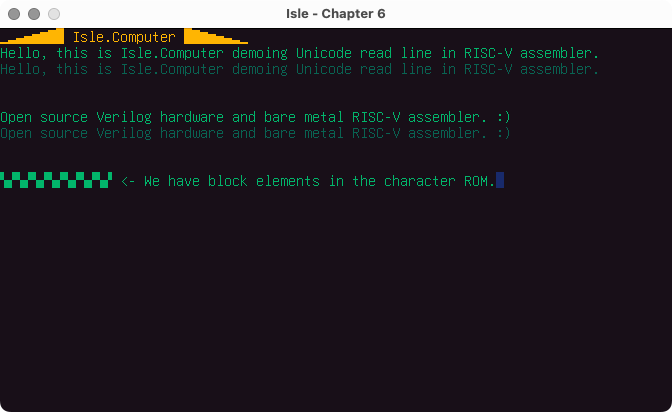
Decimal Frame counter
The chapter 6 framecount program is a decimal frame counter. You can see an example of a hexadecimal frame counter in Chapter 5 software.
Further explanation to follow.
Guess the Number
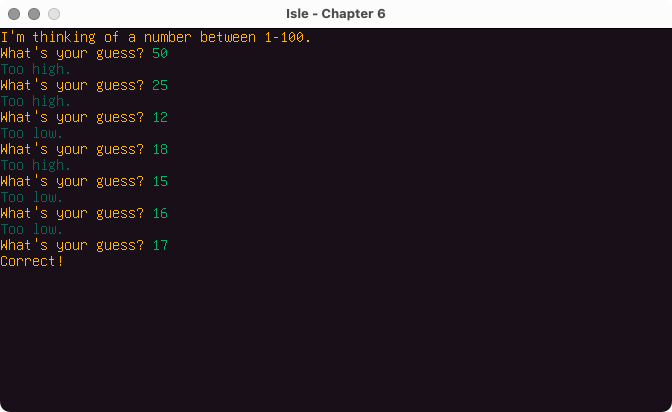
Guess is a simple game that prompts you to guess a number between 1 and 100 inclusive. Despite appearing simple, guess is a good test of our software and hardware, including random number generation, reading user input, text mode programming, and converting numbers to and from strings.
You can see example of this game in many programming languages on Rosetta code: Guess the number.
Further explanation to follow.
Number to String
The num_str example uses hardware registers to read the graphics and text mode resolutions.
Resolution
The resolution example uses hardware registers to read the graphics and text mode resolutions.
Further explanation to follow.
Next step: Chapter 6 - Input Output or Isle Index