Isle Text Mode
Published 12 Dec 2025, Updated 08 Sep 2026 (DRAFT)
In this post we introduce Isle text mode, which offers a simple and colourful way to display text. Text mode supports the full range of Unicode characters, but for this post, we use a small ROM with basic Latin and block characters. Text mode is fast; a single RISC-V store instruction can update a character.
If you're new to the project, read Isle FPGA Computer for an introduction. See Isle Index for more pages.
The Isle blog posts are drafts and will evolve as Isle evolves.
Why?
We already have bitmap hardware that support arbitrary graphics, including text. Does text mode let us do anything new? It's text mode's simplicity and low memory use make it worthwhile. Writing text becomes almost trivial, even in assembly language (see Chapter 5 software). Creating an editor and debugger are feasible (without having to deal with terminal escape codes), and we're no longer dependent on UART for basic output. By layering text mode on top of bitmaps, we can have high-resolution text and colourful graphics without exceeding the capabilities of a small FPGA.
Unicode
Unicode is more complex than the 8-bit character sets typical on older computer systems, but fundamentally, that's because human languages and orthography are complex. Rendering accurate and attractive text across the range of languages is a hard problem.
In Unicode, each character is assigned a unique code point; for example, capital F is U+0046, the same number as in ASCII. Unicode code points may be up to 21 bits long. The Unicode encoding defines how this code point is represented, with UTF-8 being a popular and efficient encoding.
Isle text mode keeps things simple by assigning one bitmap glyph to each character, which works reasonably well for many, but not all scripts, as we'll discuss below.
Font
Isle uses GNU Unifont, a fixed-width bitmap font with excellent Unicode coverage and an open licence. Full-width glyphs, such as Japanese Katakana, are 16x16 pixels, while half-width glyphs, such as the Latin alphabet, are 8x16 pixels. That's enough pixels for some glyphs to look decent and most to be legible.
Text mode in this post only supports 128 glyphs in its internal ROM, covering two Unicode blocks: Basic Latin and Block Elements. Once we add more storage, we'll use the full Unifont that covers CJK, Cyrillic, Greek, Thai, Welsh, emoji, and many other languages. I'll also add support for mixing full- and half-width glyphs in a later update. Text mode supports 16 foreground and 16 background colours for each character, taken from a palette in the same way as for bitmap graphics.
With 8x16 pixel glyphs and our display modes:
- 84x24 at 672x384 (1366x768)
- 64x24 at 512x384 (1024x768)
- 80x22 at 640x360 (1280x720)
Isle includes two fonts suitable for use in the text mode ROM:
- unifont-rom.mem - GNU Unifont (default)
- unscii-rom.mem - Unscii (classic system font style)
Unscii was designed by Viznut based on classic system fonts. To use Unscii for the test mode demo (discussed below), update FILE_FONT in the top module to reference unscii-rom.mem.
Compromise
I've tried to strike a good balance between wide language support, attractive text, and simplicity. A bitmap font with a single glyph per code point offers simplicity and wide language support, but at the cost of crude rendering, which can't handle Arabic and Indic scripts well. Once we introduce a CPU, you could implement software font rendering with bitmap graphics to produce more attractive results.
Text Mode Hardware
Text mode is built from four Verilog modules. The key modules are tram that holds the actual characters and colours, and textmode, which renders text mode for display. The font_glyph module handles loading lines of character pixels from the ROM handled by rom_sync. It's the font_glyph module that maps code points to memory locations.
- hardware/gfx/textmode.v (doc) - renders textmode for display
- hardware/mem/tram.v (doc) - holds character data: code point and colours
- hardware/gfx/font_glyph.v (doc) - loads glyph pixels given a character code point
- hardware/mem/rom_sync.v (doc) - internal ROM for 128 glyphs
Textmode
The textmode module iterates over the display, fetching the correct line of pixels for the current glyph from font_glyph. The module adjusts for the display window coordinates and scaling. You can get a sense of how the rendering works by looking at the state machine. The AWAIT state primes the pipeline, and then the DRAW state iterates over the pixels in the line before moving down one line in the glyph.
always @(posedge clk_pix) begin
    case (state)
        INIT: begin
            if (dy == win_y0) state <= AWAIT;
            tram_addr <= scroll_offset;
            tram_line_addr <= scroll_offset;
            tx <= 0;
            ty <= 0;
            gx <= 0;
            gy <= 0;
            cnt_x <= 0;
            cnt_y <= 0;
        end
        AWAIT: begin
            if (dx == draw_start_x_lat) state <= DRAW;
            colr_fg <= tram_data[WORD-CIDXW-1:WORD-2*CIDXW];
            colr_bg <= tram_data[WORD-1:WORD-CIDXW];
            pix_line_reg <= pix_line;
            ucp <= tram_data[UCPW-1:0];
        end
        DRAW: begin
            if (tx == text_hres || dx >= win_x1_minus) begin
                if (ty == text_vres || dy >= win_y1_minus) state <= IDLE;
                else if (glyph_y_end) state <= CHR_LINE;
                else state <= SCR_LINE;
            end

            // step through horizontal pixels
            if (cnt_x == scale_x_minus) begin
                cnt_x <= 0;
                gx <= (gx == GLYPH_WIDTH-1) ? 0 : gx + 1;
            end else cnt_x <= cnt_x + 1;

            if (gx == 0 && cnt_x == 0)
                tram_addr <= (tram_addr == TRAM_DEPTH-1) ? scroll_offset : tram_addr + 1;

            // register Unicode code point; TRAM_LAT+1 to reg tram_addr
            if (gx == TRAM_LAT+1 && cnt_x == 0) ucp <= tram_data[UCPW-1:0];

            // register glyph pixels and colours at end of current glyph
            if (glyph_x_end) begin
                colr_fg <= tram_data[WORD-CIDXW-1:WORD-2*CIDXW];
                colr_bg <= tram_data[WORD-1:WORD-CIDXW];
                pix_line_reg <= pix_line;
                tx <= tx + 1;
            end
        end
        CHR_LINE: begin  // prepare for next line of chars
            state <= SCR_LINE;
            tram_line_addr <= tram_line_addr + text_hres;  // address for next line of chars
            ty <= ty + 1;  // move down to next line of chars
        end
        SCR_LINE: begin  // new line of pixels
            state <= AWAIT;

            // set tram address to start of line
            if (tram_line_addr > TRAM_DEPTH-1) begin // handle wrapping
                tram_addr <= tram_line_addr - TRAM_DEPTH;
                tram_line_addr <= tram_line_addr - TRAM_DEPTH;
            end else tram_addr <= tram_line_addr;

            // begin with first char on line; reset horizontal position
            tx <= 0;
            gx <= 0;
            cnt_x <= 0;

            // step through lines (vertical pixels)
            if (cnt_y == scale_y_minus) begin
                cnt_y <= 0;
                gy <= (gy == GLYPH_HEIGHT-1) ? 0 : gy + 1;
            end else cnt_y <= cnt_y + 1;
        end
        default: begin  // IDLE
            if (start) state <= INIT;
        end
    endcase

    if (rst_pix) state <= IDLE;
end
TRAM
Text mode ram (tram) holds the characters and their colours; it's how we interface with text mode. The tram is memory mapped, so the CPU (covered in the next postL RISC-V CPU) reads and writes characters with load and store instructions. Each 32-bit location holds the Unicode code point together with 4-bit foreground and background colours. The colours are indexes into the colour palette, as with bitmap graphics.
Isle tram is dual-ported, with one port used by the CPU and the other by the display, so there is no contention, and we can handle separate system and display (pixel) clocks; vram works the same way.
The lower 21 bits hold the Unicode code point (covers all possible Unicode characters). The upper byte holds the foreground and background colours, bits 28-31 the background, and bits 24-27 the foreground. By writing a byte to the upper 8 bits, the CPU can change the colours of an existing character.
Some tram data examples:
0x07000046- Capital F (U+0046); background 0x0, foreground 0x70x19000030- Digit Zero (U+0030), background 0x1, foreground 0x90xF1002588- Full block (U+2588), background 0xF, foreground 0x1
Isle has a 2048 x 32-bit tram configuration that supports up to 84x24 or 80x25 characters. This tram configuration requires 8 KiB of block ram.
Textmaps
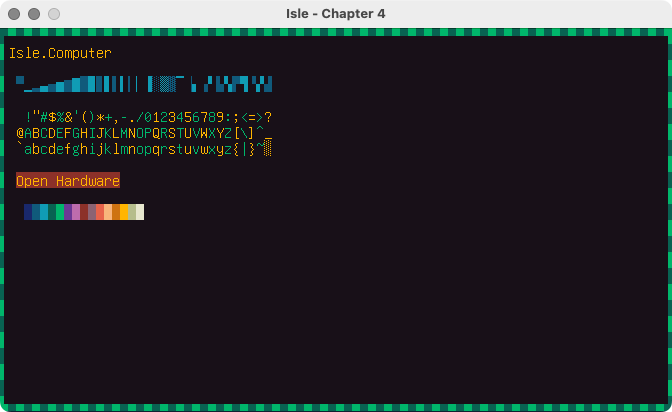
Normally, you'd write characters to tram with the CPU. We don't have a CPU yet, so we create textmaps, in the same way we created bitmap graphics. Isle includes several textmaps to test functionally and get you started, see isle/res/textmaps.
Text Mode Demo
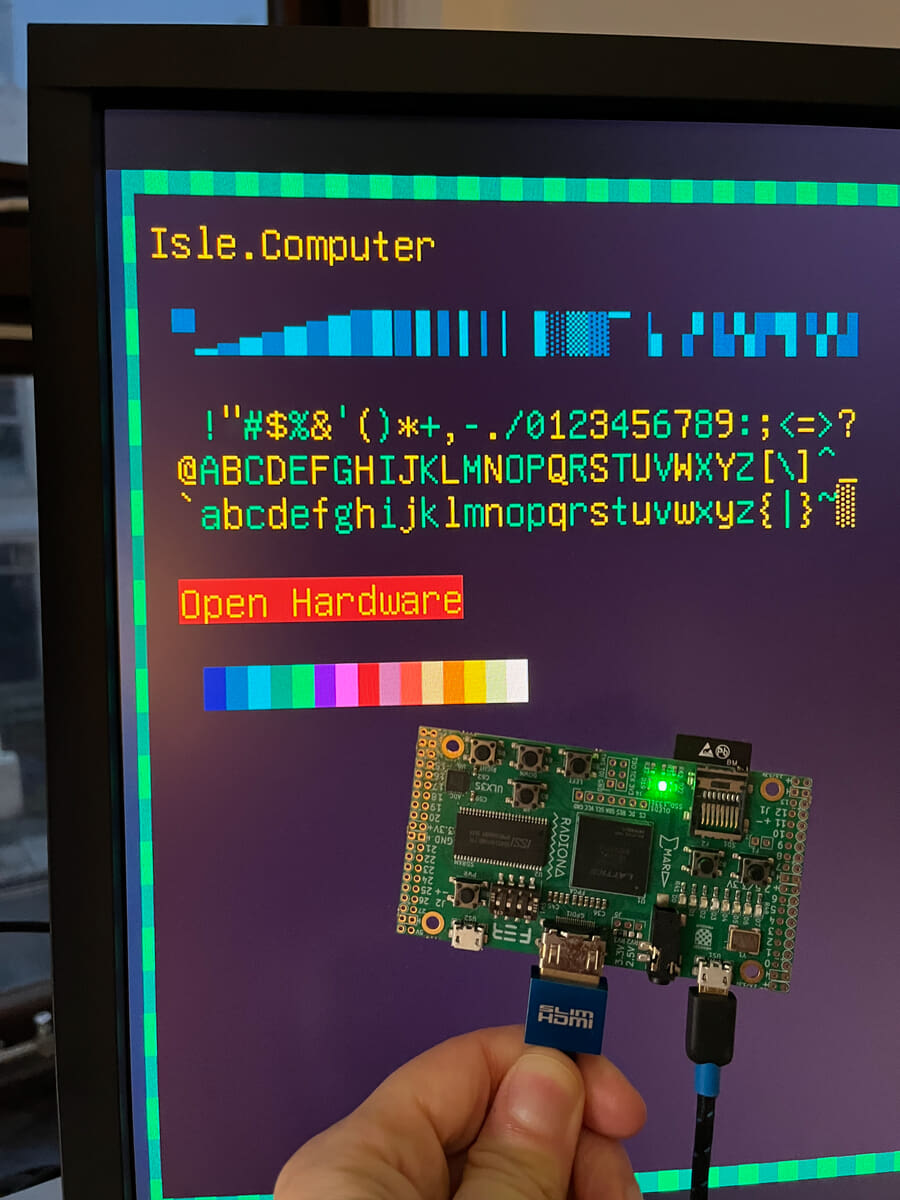
This demo runs without a CPU, relying on pre-written textmaps loaded into its tram with $readmemh.
Chapter 4 design: hardware/book/ch04/ch04.v
Build the included design. Each dev board has its own top module:
- Lakritz: boards/lakritz/ch04/top_ch04.v (build instructions)
- Nexys Video: boards/nexys_video/ch04/top_ch04.v (build instructions)
- ULX3S: boards/ulx3s/ch04/top_ch04.v (build instructions)
- Verilator: boards/verilator/ch04/top_ch04.v (build instructions)
To change the text displayed, create or edit a textmap in isle/res/textmaps and update the FILE_TXT parameter in top_ch04.v for your board. Don't forget you can use the 32 block characters to create simple graphics; refer to unifont-rom.mem for supported code points. If you use a character that's not in the ROM you'll see a shaded rectangle instead.
Thinking Machine
Text mode completes are our core graphics components. Next time we'll introduce a 32-bit RISC-V CPU and write our first software that just so happens to use text mode.
Next step: Part 2 - CPU or Isle Index
Further Reading
- Text Rendering Hates You by Aria Desires
- Coding Adventure: Rendering Text by Sebastian Lague (YouTube)