Isle Chapter 5 Software
Published 22 Jan 2026, Updated 06 Sep 2026 (DRAFT)
This page describes the Chapter 5 - RISC-V CPU, software. This software is written in bare metal RISC-V assembler without a software library. The chapter 5 hardware is simpler than the full Isle design, so this software is not compatible with the main Isle computer.
If you'd like to compile the software yourself, read the Software Build Guide. All the RISC-V instructions featured in these designs are covered in the RISC-V Assembler Guide.
If you're new to the project, read Isle FPGA Computer for an introduction. See Isle Index for more pages.
Software
- Hello - display "Hello!" using text mode
- Frame Counter - hexadecimal frame counter
- Jump - jumping figure animation
- Palette - load a palette into clut and display each colour
Hello
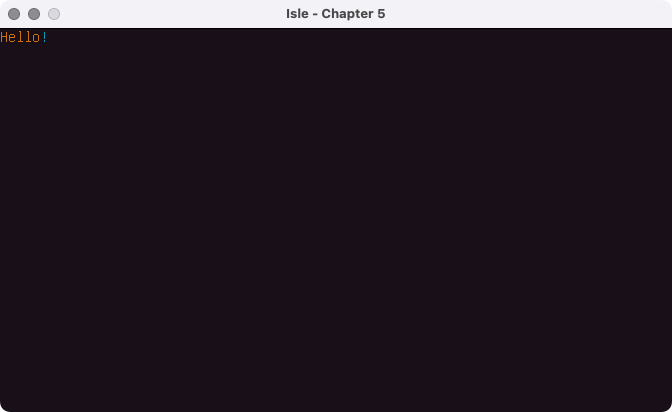
Our first example, hello, displays "Hello!" using text mode.
.equ TRAM_BASE, 0x4000  # text mode ram (tram) base address

.section .text
.global _start

_start:
    li sp, 0xC000  # stack grows down from here
    li s1, TRAM_BASE

    li t0, 0x0C000048  # colour 0xC - U+0048 - Latin Capital letter H
    sw t0, 0(s1)
    li t0, 0x0C000065  # colour 0xC - U+0065 - Latin Small letter E
    sw t0, 4(s1)
    li t0, 0x0C00006C  # colour 0xC - U+006C - Latin Small letter L
    sw t0, 8(s1)
    li t0, 0x0C00006C  # colour 0xC - U+006C - Latin Small letter L
    sw t0, 12(s1)
    li t0, 0x0C00006F  # colour 0xC - U+006F - Latin Small letter O
    sw t0, 16(s1)
    li t0, 0x03000021  # colour 0x3 - U+0021 - Exclamation mark
    sw t0, 20(s1)

.exit:
    j .exit
We use .equ to define a constant, TRAM_BASE, the starting address for text mode ram. Avoiding magic numbers in asm is as essential as anywhere else.
We then define a text section with the global symbol _start, which define the entry point for our program, where it'll start executing.
We set the stack pointer to one word beyond the top of memory with li sp, 0xC000. This example doesn't use the stack, but I always initialise the stack pointer as good practice.
With li s1, TRAM_BASE we load the tram base address into a saved register (survives function calls).
We're ready to write characters, which is straightforward once we know the tram data structure:
- 21 bits Unicode code point (UCP)
- 3 bits unused (reserved for future use)
- 4 bits foreground colour index (FG)
- 4 bits background colour index (BG)
|31  28|27  24|23  21|20                  0|
|------|------|------|---------------------|
| BG   | FG   |  -   |        UCP          |
|------|------|------|---------------------|
Thus load immediate instruction li t0, 0x0C000048 is for code point 0x0048, which is capital H (the same as ASCII), foreground colour 0xC and background colour 0x0. The colours come from palette table; for the hello example we use the default palette loaded at design time, but you'll see how to control the palette in the fourth example, below.
sw t0, 0(s1) writes the word in register t0 to the address in s1 (which we previously set to TRAM_BASE) offset by 0. This updates the first character in text mode, at the top left of the display.
We repeat this process for each character, increasing the address offset by 4 each time because our CPU is byte addressed and each tram entry is 4 bytes (one word) long.
Finally, we have an infinite loop with the .exit label, as there's no operating system to return to.
You can see which characters are supported with chapter 5 hardware by looking at unifont-rom.mem.
You're no doubt thinking this is not an elegant way to write strings! You're right. In the next chapter we'll introduce a print function that handles this for us.
Hex Frame Counter
The framecount program displays a hexadecimal frame counter at the top left of the display. We opt for hex because it's simpler to calculate than decimal, especially as we're only using the base RV32I instruction set in this chapter. You can see an example of a decimal frame counter in Chapter 6 software.
.equ TRAM_BASE,      0x4000  # text mode ram (tram) base address
.equ HWREG_BASE,     0xC000  # hardware reg base address
.equ FRAME_FLAG,     0x0110  # signals start of new frame (offset to HWREG_BASE)
.equ FRAME_FLAG_CLR, 0x0114  # clear frame flag (offset to HWREG_BASE)

.equ TEXT_COLR, 0x0D000000  # 0xXY000000 Y=foreground colour and X=background


.section .text
.global _start

_start:
    li sp, 0xC000  # stack grows down from here
    li s11, TEXT_COLR

.L_cnt_loop:
    li s1, TRAM_BASE  # needs to be in the loop to reset it after L_str_loop
    # load integer counter from memory and convert to hex string
    la a0, cnt_str  # load address of string to hold result
    la t5, cnt  # load address of counter in memory
    lw a1, 0(t5)  # load integer value of counter
    call int_strx  # convert integer to string; returns string address in a0

    # print hex number
.L_str_loop:
    lbu t2, 0(a0)  # load char
    beqz t2, .L_next_frame  # check for string end
    or t0, s11, t2  # combine text colour with code point
    sw t0, 0(s1)  # store char in tram
    addi a0, a0, 1  # next char
    addi s1, s1, 4  # next tram address
    j .L_str_loop

.L_next_frame:
    # increment counter in memory
    la t5, cnt
    lw t0, 0(t5)
    addi t0, t0, 1
    sw t0, 0(t5)

    # wait for next frame
    li a0, 1
    call frame_waitn
    j .L_cnt_loop


# frame_waitn - wait for n frame start signals
#   a0: frame count (starts) to wait for
#   return: none
#
#   returns immediately when 'a0' is zero
#
frame_waitn:
    beqz a0, 1f  # don't wait if 'a0' is zero
    li   t6, HWREG_BASE  # hwreg base addr
0:
    lw   t0, FRAME_FLAG(t6)  # load frame flag
    beqz t0, 0b  # loop if flag not set
    sw   zero, FRAME_FLAG_CLR(t6)  # clear frame flag (strobe)

    addi a0, a0, -1  # decrement remaining frame count
    bnez a0, 0b  # loop if frames remain
1:
    ret


# int_strx - integer to hexadecimal string
#   a0: address to hold decoded string (8 bytes + null terminator)
#   a1: integer
#   return: address of string start
#
int_strx:
    li   t5, 0x3A      # threshold for converting to A-F
    addi t6, a0, 8     # start with least significant digit and work back
    sb   zero, 0(t6)   # store null terminator

.L_nib_loop:
    addi t6, t6, -1    # decrement string address
    andi t0, a1, 0xF   # AND out first nibble
    addi t0, t0, 0x30  # add U+0030 offset
    blt  t0, t5, 0f    # jump to loop end if number
    addi t0, t0, 7     # add 0x7 for A-F
0:
    sb   t0, 0(t6)     # write Unicode code point to string
    srli a1, a1, 4     # shift across next nibble
    bne  t6, a0, .L_nib_loop
    ret


.section .data
.balign 4

cnt:
    .word 0

cnt_str:  # 8 bytes + null terminator
    .zero 9
The frame counter example uses data held in memory, which we define in the data section near the bottom of the source. We have a 32-bit counter at label cnt and a 9 byte string at cnt_str.
The section of code starting at .L_cnt_loop, loads the addresses of the string and counter in the data section (using the la pseudoinstruction) then loads the counter's integer value, before calling the int_strx function.
The int_strx function steps through the integer one nibble (4 bits) at a time. If the nibble is 0-9 we add 0x30 to it, which matches the Unicode (and ASCII) for numbers, 0 is 0x30, 1 is 0x31... 9 is 0x39. For values 0xA-0xF we need to add an additional 0x7 to the value because capital A is 0x41, B is 0x42 etc. For example, if our nibble is 0xC (12 decimal), we add 0x30 then add 0x7 giving 0x43, the correct value for capital C.
Further explanation to follow.
Jump
The jump program is a two frame jumping figure animation.
.equ TRAM_BASE,      0x4000  # text mode ram (tram) base address
.equ HWREG_BASE,     0xC000  # hardware reg base address
.equ FRAME_FLAG,     0x0110  # signals start of new frame (offset to HWREG_BASE)
.equ FRAME_FLAG_CLR, 0x0114  # clear frame flag (offset to HWREG_BASE)

.equ TEXT_COLR, 0x0C000000  # 0xXY000000 Y=foreground colour and X=background
.equ ANIM_RATE, 60  # frames to wait between animation
.equ TEXT_LINE, 84  # number of characters in a line
.equ TRAM_DEPTH, 84*24  # number of characters in tram


.section .text
.global _start

_start:
    li sp, 0xC000  # stack grows down from here

.L_down:
    li s1, TRAM_BASE + (4*TEXT_LINE+4)*4

    li t0, TEXT_COLR | 0x006F  # U+006F - Latin Small letter O
    sw t0, 4(s1)
    addi s1, s1, 4*TEXT_LINE  # next line (4 bytes per char)
    li t0, TEXT_COLR | 0x003C  # U+003C - Less-than sign
    sw t0, 0(s1)
    li t0, TEXT_COLR | 0x004F  # U+004F - Latin Capital letter O
    sw t0, 4(s1)
    li t0, TEXT_COLR | 0x003E  # U+003E - Greater-than sign
    sw t0, 8(s1)
    addi s1, s1, 4*TEXT_LINE
    li t0, TEXT_COLR | 0x002F  # U+002F - Solidus or Slash
    sw t0, 0(s1)
    li t0, TEXT_COLR | 0x005C  # U+005C - Backslash
    sw t0, 8(s1)

    li a0, ANIM_RATE
    call frame_waitn
    call clr_text

.L_up:
    li s1, TRAM_BASE + (2*TEXT_LINE+4)*4

    li t0, TEXT_COLR | 0x005C  # U+005C - Backslash
    sw t0, 0(s1)
    li t0, TEXT_COLR | 0x006F  # U+006F - Latin Small letter O
    sw t0, 4(s1)
    li t0, TEXT_COLR | 0x002F  # U+002F - Solidus or Slash
    sw t0, 8(s1)

    addi s1, s1, 4*TEXT_LINE  # next line
    li t0, TEXT_COLR | 0x004F  # U+004F - Latin Capital letter O
    sw t0, 4(s1)
    addi s1, s1, 4*TEXT_LINE
    li t0, TEXT_COLR | 0x002F  # U+002F - Solidus or Slash
    sw t0, 0(s1)
    li t0, TEXT_COLR | 0x005C  # U+005C - Backslash
    sw t0, 8(s1)

    li a0, ANIM_RATE
    call frame_waitn
    call clr_text
    j .L_down


# frame_waitn - wait for n frame start signals
#   a0: frame count (starts) to wait for
#   return: none
#
#   returns immediately when 'a0' is zero
#
frame_waitn:
    beqz a0, 1f  # don't wait if 'a0' is zero
    li   t6, HWREG_BASE  # hwreg base addr
0:
    lw   t0, FRAME_FLAG(t6)  # load frame flag
    beqz t0, 0b  # loop if flag not set
    sw   zero, FRAME_FLAG_CLR(t6)  # clear frame flag (strobe)

    addi a0, a0, -1  # decrement remaining frame count
    bnez a0, 0b  # loop if frames remain
1:
    ret


# clr_text - clear textmode (tram)
#   no arguments, no return
#
clr_text:
    li t5, TRAM_DEPTH
    slli t5, t5, 2  # convert depth in chars to bytes
    li t6, TRAM_BASE
    add t5, t6, t5  # end address (one after last address to clear)

0:  # loop over tram clearing locations
    sw zero, 0(t6)   # clear location
    addi t6, t6, 4   # next word
    blt t6, t5, 0b   # stop when we reach end address
    ret
The clr_text function is convenient, but not very efficient, because it clears every location in tram.
Further explanation to follow.
Palette
The palette loading example, palette.s, shows how you can load a palette at runtime from the data section.
.equ CLUT_BASE, 0x0000  # colour lookup table base address
.equ TRAM_BASE, 0x4000  # text mode ram (tram) base address

.equ PAL_NAME, pal_go  # name of palette in data section
.equ PAL_SIZE, 16  # number of colours in palette (must match PAL_NAME)

.equ CHAR, 0x2588  # U+2588 - Full block
# .equ CHAR, 0x3F  # U+003F - Question mark


.section .text
.global _start

_start:
    li sp, 0xC000  # stack grows down from here
    li s1, TRAM_BASE
    li s2, CLUT_BASE
    li s11, CHAR

    # load palette config
    li t4, PAL_SIZE  # load palette size
    la t6, PAL_NAME  # load address of palette in data section

    # load palette into colour lookup table
.L_load_pal:
    lhu t3, 0(t6)  # load palette entry (unsigned half word)
    sw t3, 0(s2)  # save palette to CLUT
    addi s2, s2, 4  # next CLUT address
    addi t6, t6, 2  # next data half word
    addi t4, t4, -1  # count down
    bnez t4, .L_load_pal

    # write characters in all palette colours
    li t4, PAL_SIZE  # number of colours in palette
    li t5, 0  # palette index
.L_disp_pal:
    slli t0, t5, 24  # shift colour index into position
    or t0, s11, t0  # combine char code point with colour
    sw t0, 0(s1)  # store to tram
    addi t5, t5, 1  # next palette entry
    addi s1, s1, 4  # next tram address (+1 word)
    blt t5, t4, .L_disp_pal

.exit:
    j .exit


.section .data
.balign 2

pal_mono:  # palette: Mono-2
    .hword 0x10A5  # 0x0 - (04, 05, 05)
    .hword 0x7BFE  # 0x1 - (30, 31, 30)

pal_aqua:  # palette: Aqua-4
    .hword 0x00AB  # 0x0 - (00, 05, 11)
    .hword 0x0171  # 0x1 - (00, 11, 17)
    .hword 0x02F7  # 0x2 - (00, 23, 23)
    .hword 0x4FDC  # 0x3 - (19, 30, 28)

pal_go:  # palette Go-16
    .hword 0x0C43  # 0x0 - (03, 02, 03)
    .hword 0x0CAD  # 0x1 - (03, 05, 13)
    .hword 0x096F  # 0x2 - (02, 11, 15)
    .hword 0x0A76  # 0x3 - (02, 19, 22)
    .hword 0x058A  # 0x4 - (01, 12, 10)
    .hword 0x02CD  # 0x5 - (00, 22, 13)
    .hword 0x34F2  # 0x6 - (13, 07, 18)
    .hword 0x5DB5  # 0x7 - (23, 13, 21)
    .hword 0x44C5  # 0x8 - (17, 06, 05)
    .hword 0x458E  # 0x9 - (17, 12, 14)
    .hword 0x7189  # 0xA - (28, 12, 09)
    .hword 0x7ACF  # 0xB - (30, 22, 15)
    .hword 0x65C2  # 0xC - (25, 14, 02)
    .hword 0x7EC0  # 0xD - (31, 22, 00)
    .hword 0x5AF1  # 0xE - (22, 23, 17)
    .hword 0x7399  # 0xF - (28, 28, 25)
You can define your own palette with its own label, just bear in mind it's in RGB555 format.
Further explanation to follow.
Next step: RISC-V CPU or Isle Index